What Is Chart of Accounts Setup?
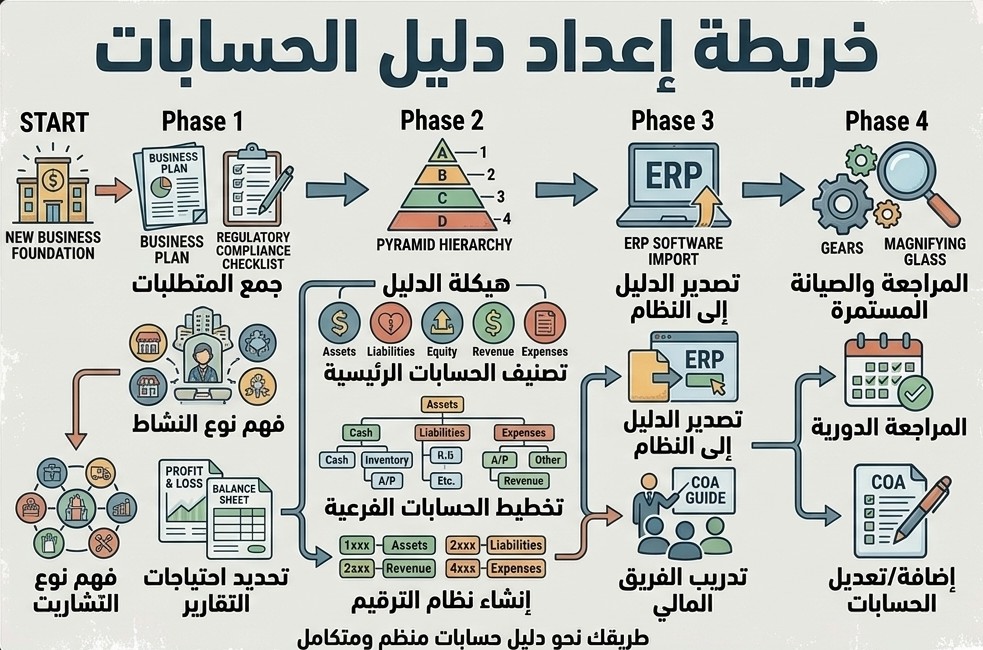
Chart of accounts setup means designing the accounting structure used to record all company transactions, such as assets, liabilities, equity, revenue, expenses, cost of sales, banks, customers, suppliers, taxes, and loans.
A good chart of accounts ensures that every transaction goes to the correct account and that reports are useful for management, accountants, auditors, and tax purposes.
It is not only about account names. It also includes account numbering, grouping, reporting structure, cost centers, tax codes, branches, projects, and opening balances.
The common mistake is using a general or ready-made chart of accounts that does not fit the business activity, so the financial report becomes unhelpful even when data is recorded.
When Does a Company Need to Set Up or Reorganize Its Chart of Accounts?
New Company
When a new company needs a clear accounting system from the beginning before transactions accumulate.
Unorganized Accounts
When there are duplicated accounts, mixed expenses, or unclear balances inside the accounting system.
Changing Accounting Software
When moving from Excel or an old system to a new accounting system and correct opening balances are needed.
VAT and Corporate Tax
When revenue, expenses, and tax accounts need to be classified in a way that supports VAT and Corporate Tax.
Management Reports
When management needs reports by branch, activity, project, department, or cost center.
Financial Statements or Audit
When the company is preparing financial statements or audit and account structure issues appear.
Components of a Good Chart of Accounts
A good chart of accounts should be clear, non-duplicated, expandable, and suitable for the company’s activity. It should not be too short to lose details, and not too long to become difficult to use.
- Current assets such as banks, cash, customers, inventory, and advance payments.
- Non-current assets such as fixed assets and accumulated depreciation.
- Current liabilities such as suppliers, accrued expenses, VAT payable, and short-term loans.
- Non-current liabilities such as long-term loans and finance obligations.
- Equity, share capital, and shareholder accounts.
- Main business revenue and other income.
- Cost of sales or cost of services.
- General and administrative expenses.
- Selling and marketing expenses.
- Finance costs and bank charges.
- VAT and Corporate Tax accounts where needed.
- Related party, loan, and advance accounts.
Account Numbering and Classification
Account numbering helps organize reports and makes searching and understanding easier. Numbering should be logical so the account type can be understood from its code or group.
For example, assets may be in one group, liabilities in another group, revenue in another group, and expenses in another group. The important point is that the system should be consistent and easy to use.
- Classifying accounts according to their nature.
- Removing duplicated or similar accounts.
- Grouping expenses clearly.
- Separating cost of sales from administrative expenses.
- Separating owner personal expenses from company expenses.
- Opening separate accounts for banks, cards, and payment gateways.
- Opening separate accounts for customers and suppliers where needed.
- Setting up clear VAT and Corporate Tax accounts.
Having many accounts does not always mean a better system. The important point is that the accounts support reporting, decisions, tax, and audit.
Setting Up Banks and Payment Channels
Banks and payment channels should be organized from the beginning because any mistake in them affects bank reconciliation, customers, suppliers, and revenue.
- Opening a separate account for each bank account.
- Opening a separate account for each company credit card.
- Setting up POS and online payment gateway accounts.
- Setting up bank transfer clearing accounts.
- Setting up bank charge and card charge accounts.
- Setting up loan and bank finance accounts.
- Defining the method for recording receipts and payments.
- Setting up a monthly reconciliation process.
Setting Up Customers and Suppliers
The accounting system should separate customers, suppliers, and general ledger accounts. Using one general account for all customers or all suppliers can make reports unhelpful and create differences.
- Organizing customer and supplier records.
- Preventing duplicated names or different spellings.
- Linking invoices, receipts, and payments with the correct account.
- Preparing opening balances for each customer and supplier.
- Identifying advance payments from customers and to suppliers.
- Preparing ageing reports.
- Preparing a clear statement for each party.
- Reviewing VAT-registered suppliers and invoice details.
Setting Up VAT Accounts in the System
A VAT-registered company needs tax accounts that help prepare the VAT return and reconcile invoices with reports.
There should be clear accounts for output VAT on sales, input VAT on purchases, adjustments or differences, and paid or payable VAT returns.
- Setting up output VAT on sales.
- Setting up input VAT on purchases.
- Setting up tax codes for taxable, exempt, and out-of-scope supplies where needed.
- Setting up treatment for credit notes and returns.
- Linking tax invoices with reports.
- Preparing VAT reports by tax period.
- Reconciling VAT with accounts, banks, and invoices.
- Preparing a supporting document file for returns.
Setting Up Accounts for Corporate Tax
Corporate Tax starts from accounting profit as per the financial statements, with required adjustments. The chart of accounts should therefore allow proper separation of revenue and expenses to support the review of taxable profit.
- Separating main revenue from other income.
- Separating cost of sales from administrative expenses.
- Identifying unsupported or mixed expenses.
- Separating owner personal expenses from company expenses.
- Setting up fixed asset and depreciation accounts.
- Setting up loans, advances, and shareholder accounts.
- Setting up related party accounts where needed.
- Supporting financial statements and the Corporate Tax file.
The clearer the chart of accounts is, the easier it becomes to review profit, expenses, and Corporate Tax with fewer errors.
Cost Centers, Branches, and Projects
Some companies do not only need to know total profit. They need to know the profit of each branch, project, activity, or salesperson.
In this case, cost centers or classifications should be set up inside the accounting system so results are not mixed.
- Cost centers for branches.
- Cost centers for projects.
- Classification by activity or service type.
- Profitability report for each branch or project.
- Clear allocation of shared expenses.
- Tracking revenue and expenses by department.
- Preparing management reports that support decisions.
Setting Up Inventory and Fixed Assets
If the company has inventory, items, groups, cost, and movement tracking should be set up. If the company has fixed assets, a clear fixed asset register should be prepared from the beginning.
- Setting up inventory groups and items.
- Defining how cost of sales will be tracked.
- Setting up inventory, damaged stock, and return accounts.
- Preparing the fixed asset register.
- Separating fixed assets from operating expenses.
- Setting up accumulated depreciation accounts.
- Tracking additions and disposals.
- Preparing inventory and asset reports for audit and financial statements.
Opening Balances When Starting the System
When setting up a new accounting system, opening accounts is not enough. Correct opening balances should be entered for banks, customers, suppliers, inventory, fixed assets, loans, VAT, and capital.
Wrong opening balances will make reports incorrect even if new transactions are recorded properly.
- Balance of each bank account at the start date.
- Open customer balances.
- Open supplier balances.
- Inventory balance at the start date.
- Fixed assets and accumulated depreciation.
- Loans and liabilities.
- VAT payable or recoverable where applicable.
- Share capital and shareholder accounts.
- Other debit and credit balances.
A new system with wrong opening balances means the reports will remain wrong, even if new invoices are recorded correctly.
Accounting Policies and Procedures
Accounting system setup is not complete without clear procedures: who enters the invoice, who reviews it, how expenses are approved, how documents are stored, and when bank reconciliation is performed.
- Sales invoice issuing policy.
- Supplier invoice recording policy.
- Expense approval procedures.
- Receipt and payment procedures.
- Document filing process.
- Monthly bank reconciliation procedures.
- VAT review procedures.
- Monthly closing procedures.
- User permissions inside the accounting system.
Documents Required for Accounting System Setup
- Trade licence and activity details.
- Old chart of accounts or reports, where available.
- Bank statements.
- Customer and supplier balances at the start date.
- Inventory list where applicable.
- Fixed asset list where applicable.
- Loans and liabilities.
- Previous VAT returns where available.
- Details of branches, projects, or cost centers.
- Management reporting requirements.
- Details of the accounting software currently used or intended to be used.
Steps to Set Up the Chart of Accounts and Accounting System
- Understand the business activity and transaction volume.
- Identify management reporting requirements.
- Review the old system or files where available.
- Design a chart of accounts suitable for the activity.
- Set up banks, customers, and suppliers.
- Set up VAT and Corporate Tax accounts.
- Set up cost centers, branches, and projects where needed.
- Set up inventory and fixed assets.
- Enter opening balances.
- Test the main reports.
- Define document cycle and user permissions.
- Deliver the system ready for use and follow-up.
Common Mistakes in Chart of Accounts Setup
- Using a ready-made chart of accounts that does not fit the activity.
- Opening too many unnecessary accounts.
- Duplicating the same account under different names.
- Mixing cost of sales with administrative expenses.
- Mixing owner personal expenses with company expenses.
- Not setting up VAT accounts clearly.
- Not separating customers and suppliers properly.
- Entering unmatched opening balances.
- Not using cost centers although they are needed.
- Not preparing management reports from the beginning.
- Not defining user permissions.
- Not having monthly reconciliation and closing procedures.
The biggest mistake is starting the system quickly, then discovering after one year that reports do not serve management, tax, or audit.
Reports the System Should Support
- Income statement or profit and loss report.
- Balance sheet or statement of financial position.
- Cash flow report where needed.
- Bank reconciliation report.
- Customer and ageing report.
- Supplier and accounts payable report.
- Sales and expense report by period.
- VAT report.
- Corporate Tax report and supporting analysis.
- Cost center, branch, or project report.
- Inventory and fixed asset report.
Who Needs This Service?
- New companies starting an accounting system from zero.
- Companies using Excel and planning to move to accounting software.
- Companies with an unorganized chart of accounts.
- Companies suffering from reports that are not useful for management.
- VAT-registered companies or companies preparing for VAT registration.
- Companies preparing for Corporate Tax.
- Companies with branches, projects, or cost centers.
- Companies organizing accounts before audit.
- Companies correcting their accounting system after using it for some time.
- Companies that need a clear document cycle and user permissions.
How Can Al Basma Help with Accounting System Setup?
Al Basma studies the company’s activity, workflow, and reporting needs, then prepares a suitable chart of accounts and links it with banks, customers, suppliers, VAT, and Corporate Tax.
We help set up opening balances, cost centers, inventory, fixed assets, user permissions, and document cycle so the system becomes suitable for daily use and monthly reports.
We also review the system after operation to confirm that accounts are working properly and that reports support management decisions, VAT, Corporate Tax, and audit preparation.
Services Related to Chart of Accounts Setup
Why Choose Al Basma for Chart of Accounts Setup?
- Design a chart of accounts suitable for the business activity, not only a general template.
- Set up banks, customers, suppliers, VAT, and Corporate Tax clearly.
- Set up cost centers, branches, and projects where needed.
- Enter correct opening balances supported by documents.
- Prepare the system for monthly reports, financial statements, and audit.
- Provide recommendations for document cycle, user permissions, and monthly closing.
Important Notice:
The information provided on this page is intended for general informational purposes only and does not constitute legal, tax, accounting, or professional advice. It should not be relied upon as a substitute for reviewing the applicable laws, regulations, decisions, and official guidance issued by the competent authorities in the United Arab Emirates.
The appropriate legal, tax, or accounting treatment may vary depending on the specific facts and circumstances of each case.
If you require professional advice or assistance relating to your particular situation, please contact us and our team will be pleased to review your case and provide appropriate support.
Related Updates and Articles